

Need Answers to Past Papers?
Get accurate answers for KCPE, KCSE, CDACC, KPSEA, KNEC, Edexcel, and more exams. Contact us now for quick help!
Contact Us on WhatsAppPAY ATTENTION: JOIN US ON WHATSAPP TO ACCESS RECENT PASTPAPERS & NOTES
University of Nairobi Student Portal – Login, Registration, Results & Fees
Official Portal: studentportal.uonbi.ac.ke
📢 Update 2026: The University of Nairobi has upgraded its student portal with improved fee payment integration and faster results upload. Always use the official URL above.
What is the University of Nairobi Student Portal?
The University of Nairobi student portal is an official online platform available at studentportal.uonbi.ac.ke. It gives every enrolled student secure, 24/7 digital access to their academic and financial records. Whether you need to register for units, check your exam results, or view your fee balance, the UoN portal is your one-stop destination.
The University of Nairobi is Kenya’s oldest and largest public university, serving over 60,000 students across multiple campuses. The student portal was introduced to reduce physical queues and make administrative services faster and more transparent for all students.
Services Available on the University of Nairobi Student Portal
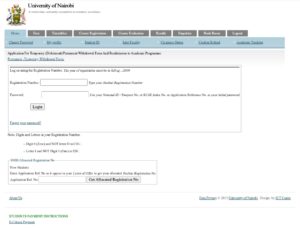
- Online unit/course registration – Register for semester units without visiting the registrar’s office.
- Exam results – View and download your official semester results anytime.
- Fee statement & payment – Check your fee balance, download fee structure, and confirm payments made via MPESA or bank.
- Admission letter download – New students can download their official UoN admission letter.
- Timetable access – View your personal lecture and exam timetable.
- Transcript request – Apply for official academic transcripts online.
- Clearance application – Initiate your graduation clearance process through the portal.
- Supplementary exam application – Apply for special or supplementary exams online.
- Personal details update – Update contact information and emergency contacts.
How to Register on the UoN Student Portal
New students admitted to the University of Nairobi must create their portal account before they can access any services. Follow these steps:
- Visit the official portal at studentportal.uonbi.ac.ke.
- Click on “New Student Registration” or “Create Account” on the login page.
- Enter your admission number as provided in your UoN admission letter.
- Enter your National ID number or KCSE index number as your initial password.
- Verify your registered email address or phone number via the OTP sent to you.
- Set a new strong password of your choice.
- Log in with your admission number and new password to complete the setup.
How to Login to the University of Nairobi Student Portal
Logging in to the UoN student portal is straightforward once your account is set up. Here is the step-by-step process:
- Open your browser and go to studentportal.uonbi.ac.ke.
- On the login page, enter your student admission number in the username field.
- Enter your password in the password field.
- Click the “Login” button to access your dashboard.
- From the dashboard, navigate to the service you need — results, registration, fees, etc.
Forgot Password – How to Reset Your UoN Portal Password
If you have forgotten your University of Nairobi student portal password, follow these steps to reset it:
- Go to studentportal.uonbi.ac.ke and click “Forgot Password” below the login form.
- Enter your student admission number and your registered email address or phone number.
- Check your email or SMS for a password reset link or OTP code.
- Click the link or enter the OTP, then create a new password.
- Log in with the new password.
If you no longer have access to the email or phone number on record, visit the University of Nairobi ICT Helpdesk on your campus with your student ID card for manual password reset assistance.
Common Issues & Fixes on the UoN Student Portal
- Portal not loading: Clear your browser cache or try a different browser (Chrome or Firefox recommended).
- Wrong password error: Make sure you’re using your current password, not the default one. Use “Forgot Password” if needed.
- Results not showing: Results are uploaded after the Senate approves them. Check back after the official results release date.
- Fee payment not reflecting: Allow up to 24 hours for MPESA payments to reflect. Keep your transaction confirmation as proof.
- Cannot register units: Ensure your fee balance meets the minimum required threshold for that semester.
- Account locked: Multiple failed login attempts lock accounts. Contact ICT support to unlock.
Important Links – University of Nairobi
| Resource | Link |
|---|---|
| Student Portal | studentportal.uonbi.ac.ke |
| UoN Main Website | www.uonbi.ac.ke |
| HELB Application | helb.co.ke |
| KUCCPS Portal | students.kuccps.net |
FAQs – University of Nairobi Student Portal
PAY ATTENTION: JOIN US ON WHATSAPP TO ACCESS RECENT PASTPAPERS & NOTES