

Need Answers to Past Papers?
Get accurate answers for KCPE, KCSE, CDACC, KPSEA, KNEC, Edexcel, and more exams. Contact us now for quick help!
Contact Us on WhatsAppPAY ATTENTION: JOIN US ON WHATSAPP TO ACCESS RECENT PASTPAPERS & NOTES
Maseno University Student Portal – Login, Registration, Results & Fees
Official Portal: student.maseno.ac.ke
📢 Update 2026: Maseno University now offers eCampus integration within the main student portal. Distance learning students can access all materials from the same login dashboard.
What is the Maseno University Student Portal?
The Maseno University student portal is an online platform accessible at student.maseno.ac.ke. It is the official self-service system where students can access all key academic and administrative services from one place. The portal serves over 21,000 students enrolled at Maseno University’s various campuses and eCampus.
Maseno University, famously located along the Equator in Maseno Township, was established in 1991 and has grown into one of Kenya’s most respected institutions. The student portal reflects the university’s commitment to digital transformation and accessible education. It supports both on-campus and eCampus (distance learning) students.
Services Available on the Maseno University Student Portal
- Course/unit registration – Register for semester units online before the deadline.
- Exam results – View and download semester examination results.
- Fee statement – Check your current fee balance, invoices, and payment history.
- Timetable – View personal lecture and exam timetables each semester.
- eCampus access – Online learners access course materials and assignments through the integrated eCampus.
- Admission letter download – New students can retrieve their admission letter digitally.
- Transcript request – Apply for certified academic transcripts online.
- Clearance application – Initiate your graduation clearance through the portal.
- Profile management – Update personal contact and emergency information.
How to Register on the Maseno University Student Portal
- Visit student.maseno.ac.ke and click “Register” or “Create Account”.
- Enter your Admission Number — for example, BA/00001/2023.
- Use your National ID number, Passport, or Birth Certificate number as your initial password.
- Provide your email address and phone number.
- Set a new strong password when prompted.
- Verify your account via the email or SMS confirmation sent to you.
- Log in with your admission number and the new password you set.
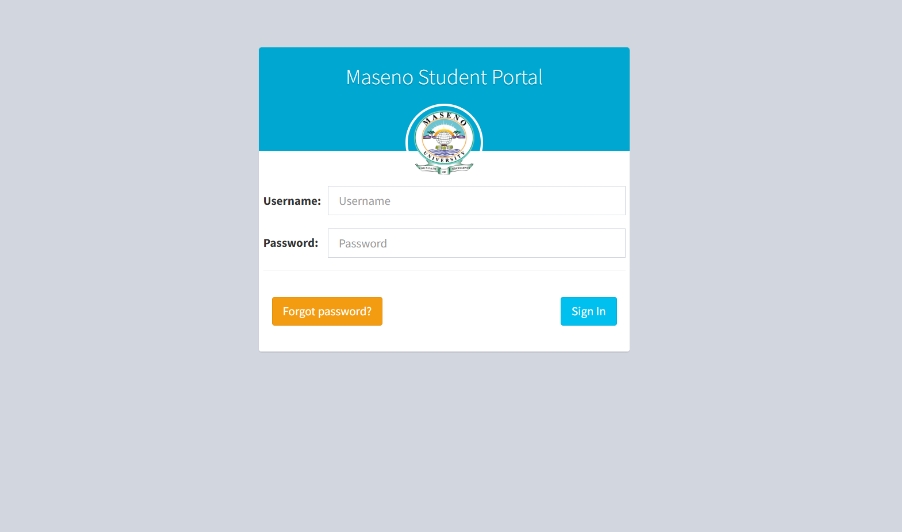
How to Login to the Maseno University Student Portal
- Open your browser and go to student.maseno.ac.ke.
- Enter your Admission Number (e.g. BA/00001/2023) in the Username field.
- Enter your password in the Password field.
- Click “Sign In” to access your dashboard.
- From the dashboard, navigate to results, registration, fees, or eCampus as needed.
Forgot Password – Reset Maseno Portal Password
- Go to student.maseno.ac.ke and click “Forgot Password”.
- Enter your Admission Number and registered email address.
- Check your email inbox for a password reset link from Maseno University.
- Click the link and enter a new password.
- Log in using the updated credentials.
If you cannot access your registered email, contact the Maseno University ICT Department via ict@maseno.ac.ke or visit the ICT office on the main campus in person with your student ID.
Common Issues & Fixes
- Default password not working: Ensure you are entering your National ID, Passport, or Birth Certificate number correctly with no spaces.
- Results not showing: Results are uploaded per faculty after board approval. Check the Maseno website or notice boards for the official release date.
- Portal not accessible: Try clearing your browser cache or use a different browser. The portal works best on Chrome or Firefox.
- eCampus not accessible: eCampus is a separate system at ecampus.maseno.ac.ke. Ensure your online enrollment is complete.
- Fee payment not reflecting: Give it 24–48 hours. If unresolved, contact the Finance office at your campus with your payment confirmation.
Important Links – Maseno University
| Resource | Link |
|---|---|
| Maseno Student Portal | student.maseno.ac.ke |
| Maseno eCampus | ecampus.maseno.ac.ke |
| Maseno Main Website | www.maseno.ac.ke |
| HELB Portal | helb.co.ke |
FAQs – Maseno University Student Portal
1. What is the Maseno University student portal URL?
The official portal URL is student.maseno.ac.ke. Always use this direct link.
2. What is my default password for the Maseno portal?
Your default password is your National ID number, Passport number, or Birth Certificate number used during KCSE registration. Change it immediately after first login.
3. How do I check my Maseno University exam results?
Log in to student.maseno.ac.ke, click on “Examination Results”, and select your current semester to view your grades.
4. Is Maseno eCampus the same as the student portal?
No. The student portal at student.maseno.ac.ke handles academic registration, results, and fees. The eCampus at ecampus.maseno.ac.ke is specifically for online learning and course content access.
5. Does Maseno University accept MPESA fee payments?
Yes. Maseno University uses MPESA for fee payments. The paybill number and your admission number as account number are available in the fees section on your portal dashboard.
PAY ATTENTION: JOIN US ON WHATSAPP TO ACCESS RECENT PASTPAPERS & NOTES