

Need Answers to Past Papers?
Get accurate answers for KCPE, KCSE, CDACC, KPSEA, KNEC, Edexcel, and more exams. Contact us now for quick help!
Contact Us on WhatsAppPAY ATTENTION: JOIN US ON WHATSAPP TO ACCESS RECENT PASTPAPERS & NOTES
Kenyatta University Student Portal – Login, Registration, Results & Fees
Official Portal: portal.ku.ac.ke
📢 Update 2026: KU has integrated the KUSOMA e-learning platform with the main student portal. Students can now access digital learning resources directly from their portal dashboard.
What is the Kenyatta University Student Portal?
The Kenyatta University student portal, accessible at portal.ku.ac.ke, is the official self-service platform for all KU students. Through this portal, students can manage their entire academic life online — from unit registration and results checking to fee payment and clearance applications.
Kenyatta University is one of Kenya’s leading public universities with campuses across the country. The KU portal serves tens of thousands of students and is available 24 hours a day, seven days a week. It was designed to eliminate unnecessary trips to university offices and speed up access to critical student information.
Services Available on the Kenyatta University Student Portal
- Course/unit registration – Register for your semester units online before the deadline.
- Exam results – Check and download your semester examination results.
- Fee statement – View your current fee balance, download invoices, and confirm payments.
- Admission letter – Download your KU admission letter for new students.
- Academic timetable – View your personal lecture and exam timetable each semester.
- KUSOMA e-learning – Access digital course materials and online learning resources.
- Transcript and clearance – Apply for transcripts and initiate graduation clearance online.
- Supplementary exam applications – Apply for missed or special examinations.
- Student ID status – Track the status of your student ID card.
How to Register on the KU Student Portal
Creating your account on the Kenyatta University student portal is done once during admission. Follow these steps carefully:
- Go to portal.ku.ac.ke and click “Create Account” or “Register”.
- Enter your Student ID. Note: Use only the sequential numbers — for example, if your full student number is M25S/5942/2005, enter 5942/2005 as the Student ID.
- Enter your First Name and Last Name exactly as they appear on your admission letter.
- Provide a valid email address and phone number.
- Set a strong password and confirm it.
- Submit the form. A confirmation email will be sent to activate your account.
- Click the activation link in your email to complete registration.
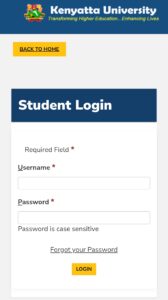
How to Login to the Kenyatta University Student Portal
- Navigate to portal.ku.ac.ke in your web browser.
- Enter your Student ID (sequential numbers only) in the username field.
- Type your password in the password field.
- Click “Login” to access your student dashboard.
- From the dashboard, select the service you need from the navigation menu.
Forgot Password – Reset Your KU Portal Password
- Visit portal.ku.ac.ke and click “Forgot Password” on the login page.
- Enter your registered email address associated with your KU account.
- Check your inbox for a password reset email from Kenyatta University.
- Follow the link in the email to set a new password.
- Log in with your new password.
If you face difficulties, contact the KU ICT Helpdesk via email at ict@ku.ac.ke or visit the ICT department on your campus.
Common Issues & Fixes
- Portal down or slow: KU portal can be slow during peak registration periods. Try early morning or late evening access.
- Invalid credentials: Confirm you are entering the short Student ID format (sequential numbers), not the full student number.
- Results not available: KU results are released after Senate approval. Check official KU social media for release announcements.
- Fee not reflecting: MPESA payments take up to 24–48 hours. If still not showing after 48 hours, visit the finance office with your proof of payment.
- Cannot register units due to fee balance: You must clear at least 60% of your fees before unit registration is allowed each semester.
Important Links – Kenyatta University
| Resource | Link |
|---|---|
| KU Student Portal | portal.ku.ac.ke |
| KU Main Website | www.ku.ac.ke |
| KUSOMA eLearning | kusoma.ku.ac.ke |
| Transcripts & Clearance | studentonlineservices.ku.ac.ke |
| HELB Portal | helb.co.ke |
FAQs – Kenyatta University Student Portal
1. What is the Kenyatta University student portal URL?
The official portal is at portal.ku.ac.ke. Do not use third-party sites to log in.
2. What is the Student ID format for KU portal login?
Use the sequential numbers from your student number only. For example, from M25S/5942/2005, the Student ID is 5942/2005.
3. How do I check my KU exam results?
Log in to the portal and click on “Examinations” → “Results”. Select the semester and academic year to view your grades.
4. How long does MPESA fee payment take to reflect on KU portal?
MPESA payments usually reflect within 24–48 hours. If it does not reflect after 48 hours, contact the Finance Department with your MPESA confirmation code.
5. Can I access the KU portal on my mobile phone?
Yes. The portal works on mobile browsers. Use Chrome or Firefox and switch to desktop mode for the best experience.
6. How do I get my KU admission letter from the portal?
New students can download their admission letter by logging in and navigating to “Admissions” → “Admission Letter” on the dashboard.
PAY ATTENTION: JOIN US ON WHATSAPP TO ACCESS RECENT PASTPAPERS & NOTES