

Need Answers to Past Papers?
Get accurate answers for KCPE, KCSE, CDACC, KPSEA, KNEC, Edexcel, and more exams. Contact us now for quick help!
Contact Us on WhatsAppPAY ATTENTION: JOIN US ON WHATSAPP TO ACCESS RECENT PASTPAPERS & NOTES
JKUAT Student Portal – Login, Registration, Results & Fees
Official Portal: portal.jkuat.ac.ke
📢 Update 2026: JKUAT has enhanced its online portal with improved unit registration and results modules. Students are advised to use the latest version of Chrome or Firefox for the best experience.
What is the JKUAT Student Portal?
The JKUAT student portal at portal.jkuat.ac.ke is the official online platform for students of Jomo Kenyatta University of Agriculture and Technology. It provides a centralized digital space where students can access academic, financial, and administrative services without visiting any physical office.
JKUAT is a leading technical university in Kenya with campuses spread across the country. The student portal supports thousands of students across all its constituent colleges, making it one of the most heavily used educational portals in the region. Whether you are a new student trying to register or a continuing student checking results, the JKUAT portal is your go-to platform.
Services Available on the JKUAT Student Portal
- Unit registration – Register for your semester or trimester units online.
- Exam results – View official results for each semester after Senate approval.
- Fee balance & payment details – Check outstanding fees and get MPESA paybill information.
- Timetable – Access your personal lecture and examination timetable.
- Admission letter download – New students can retrieve their admission letters digitally.
- Transcript request – Submit online requests for official academic transcripts.
- Clearance application – Initiate graduation and completion clearance procedures.
- Hostel application – Apply for university accommodation through the portal.
- Personal data management – Update your contact information and profile details.
How to Register on the JKUAT Student Portal
- Go to portal.jkuat.ac.ke and click “Sign Up” or “Don’t have an account? Register”.
- Enter your Admission Number as shown in your JKUAT admission letter.
- Provide your National ID number or Birth Certificate number as your initial identifier.
- Enter a valid email address and phone number.
- Create and confirm a strong password.
- Submit the registration form and activate your account via the link sent to your email.
How to Login to the JKUAT Student Portal
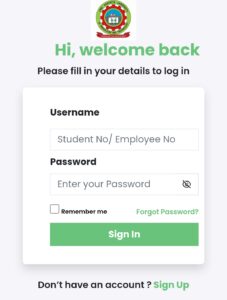
- Open your browser and visit portal.jkuat.ac.ke.
- Enter your Admission Number in the username/email field.
- Enter your password.
- Click “Login” to proceed to your student dashboard.
- Use the menu to navigate to results, registration, fees, or other services.
Forgot Password – Reset JKUAT Portal Password
- Go to portal.jkuat.ac.ke and click “Forgot Password”.
- Enter your registered email address or admission number.
- A reset link or OTP will be sent to your registered email or phone.
- Follow the instructions to create a new password.
- Log in using the new password.
If the reset process fails, visit the JKUAT ICT Directorate at the main campus or contact ict@jkuat.ac.ke for manual assistance.
Common Issues & Fixes
- Portal loads blank page: Disable browser extensions or switch to Chrome/Firefox.
- Admission number not recognized: Confirm you are using the exact format printed on your admission letter — no extra spaces.
- Results showing “not available”: JKUAT results are released after academic board approval. Check the university website for the official release date.
- Fee payment not updated: Give it 24 hours. If not updated, take your MPESA receipt to the Finance office.
- Unit registration blocked: Clear at least the minimum required fee balance before attempting to register units.
- Account suspended: This usually happens due to repeated failed login attempts. Contact ICT to reinstate your account.
Important Links – JKUAT
| Resource | Link |
|---|---|
| JKUAT Student Portal | portal.jkuat.ac.ke |
| JKUAT Main Website | www.jkuat.ac.ke |
| HELB Portal | helb.co.ke |
| KUCCPS Portal | students.kuccps.net |
FAQs – JKUAT Student Portal
1. What is the JKUAT student portal URL?
The official JKUAT student portal is at portal.jkuat.ac.ke. Always access the portal directly from this URL.
2. How do I get my JKUAT admission number?
Your admission number is printed on your official JKUAT admission letter sent via email or post after KUCCPS placement confirmation.
3. Does JKUAT use a semester or trimester system?
JKUAT operates on a trimester system. There are three trimesters per academic year. Unit registration must be completed at the start of each trimester.
4. How do I check my JKUAT exam results online?
Log in to the portal at portal.jkuat.ac.ke, click on “Academic” → “Results”, and select your trimester to view your grades.
5. What is the JKUAT MPESA paybill for fee payment?
The JKUAT MPESA paybill number is available in your fee structure document on the portal. Use your admission number as the account number when paying.
6. Can JKUAT constituent college students use the same portal?
Yes. Students from all JKUAT constituent colleges including Karen Campus, Westlands Campus, and City Campus use the same portal at portal.jkuat.ac.ke.
PAY ATTENTION: JOIN US ON WHATSAPP TO ACCESS RECENT PASTPAPERS & NOTES